Subsections of Advanced Usage & Admin
Generate an access token on the Hub
Visit the TRR379 collaboration hub and log in with your credentials. If you do not have an account, see instructions on how to get a Hub account and log in and to configure your permissions.
Click your avatar in the top-right corner, and navigate to Settings > Applications.
Under Access tokens click New access token, and fill in the form:
- Give the token a recognizable name (e.g., “Pool token”)
- Choose
Allfor Repository and organization access - Under Select permissions, enable:
organization: Read,repository: Read and write, anduser: Read.
Click Generate token.
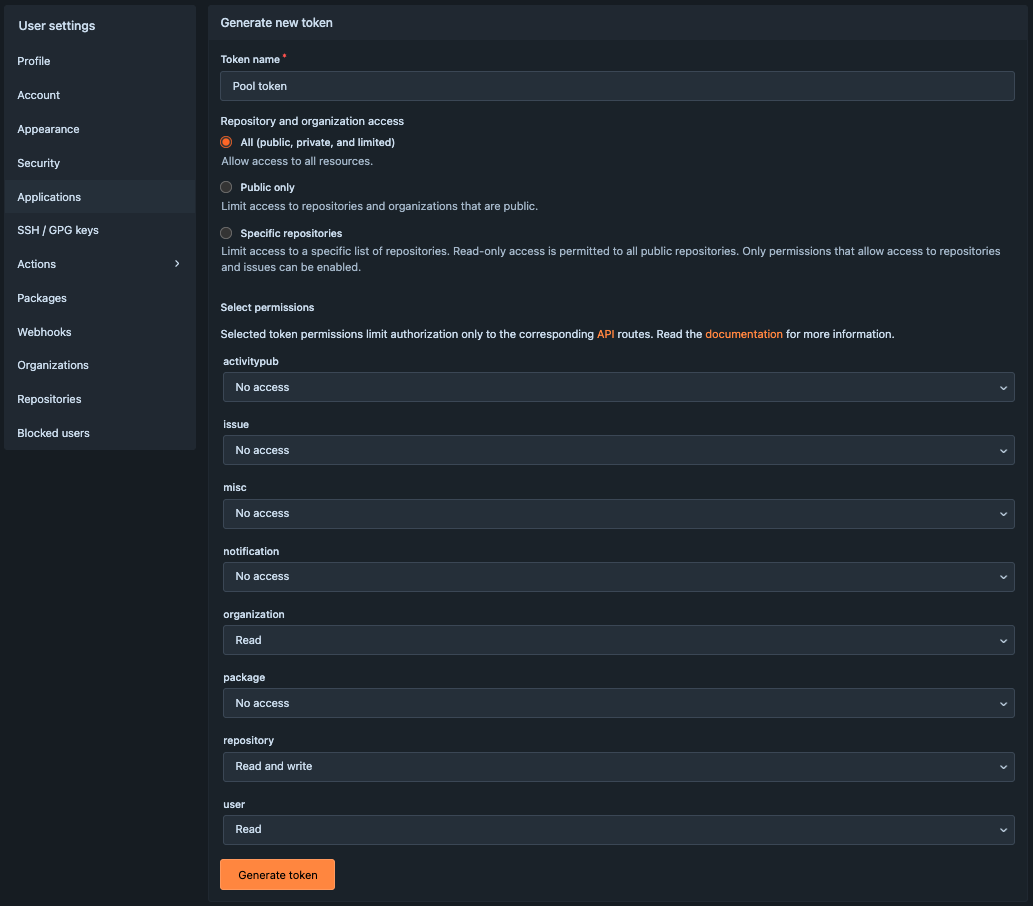
- The token appears as a long string. Copy the generated value immediately, and store it safely. It disappears after refreshing.
Important
Treat your token like a password; do not share it publicly. Once generated, the same token can be reused for all future sessions.
Deploy services
Subsections of Deploy services
Dump-things API
The metadata service is a small application built on FastAPI that can be deployed running in a virtual environment, managed by Hatch – running under an unprivileged user account. This scenario is described here. However, any other deployment approaches suitable for Python-based applications may work just as fine.
Required software
The only software that is required outside the virtual environment (and the web server) is pipx, which is used to deploy hatch for a user – no need for administrator privileges otherwise.
User account setup
Here we set up a dedicated user dumpthing to run the service.
However, the service could also run under any other (existing) user account.
Service environment setup
Everything in this section is done under the target user account.
Use something like sudo -u dumpthing -s to enter it.
The following commands perform the initial setup, which provides an installation of the dump-things-service to query and encrich the TRR379 knowledge base.
If the service comes up with no error, we can ctrl-c it.
Service management with systemd
We use systemd for managing the service process, the launch, and logging.
This makes it largely unnecessary to interact with hatch directly, and allows for treating the user-space service like any other system service on the system.
The following service unit specification is all that is needed.
With this setup in place, we can control the service via systemd.
Web server setup
Here we use caddy as a reverse proxy to expose the services via https at metadata.trr379.de.
A matching DNS setup must be configured separately.
Afterwards we can reload the web server configuration and have it expose the service.
Updates and curation
Whenever there are updates to the to-be-served curated metadata, the setup described here only required the equivalent of a git pull to fetch these updates from the “knowledge” repository.
When records are submitted, they end up in the directory matching the token that was used for submission.
Until such records are integrated with the curated metadata in global_store, they are only available for service requests that use that particular token.
An independent workflow must be used to perform this curation (acceptance, correction, rejection) of submitted records.
Neurobagel
NeuroBagel is a collection of containerized services that can be deployed in a variety of way. This page describes a deployment using podman and podman-compose that is confirmed to be working on machine with a basic Debian 12 installation.
For other installation methods, please refer to the NeuroBagel documentation.
The following instruction set up a “full-stack” NeuroBagel deployment. The contains all relevant components
- query front-end
- federation API
- node API
- graph database
This setup is suitable for a self-contained deployment, such as the central TRR379 node. Other deployments may only need a subset of these services.
On the target machine, NeuroBagel services will run “rootless”. This means they operate under a dedicated user account with minimal privileges.
Required software
Only podman, and its compose feature are needed. They can be installed via the system package manager.
User setup
We create a dedicated user neurobagel on the target machine.
NeuroBagel will be deployed under this user account, and all software and data will be stored in its HOME directory.
Configure NeuroBagel
In the HOME directory of the neurobagel user we create the complete runtime environment for the service.
All configuration is obtained from a Git repository.
Web server setup
NeuroBagel comprises a set of services that run on local ports that are routed to the respective containers.
Here we use caddy as a reverse proxy to expose the necessary services via https at their canonical locations.
A matching DNS setup must be configured separately.
Manage NeuroBagel with systemd
We use systemd for managing the NeuroBagel service processes, the launch, and logging. This makes it largely unnecessary to interact with podman directly, and allows for treating the containerized NeuroBagel like any other system service.
The following service unit specification is all that is needed. With more recent versions of podman and podman-compose better setups are possible. using podman version. However, this one is working with the stock versions that come with Debian 12 (podman 4.3.1 and podman-composer 1.0.3) and requires no custom installations.
Launch
With this setup in place, we can launch NeuroBagel